
AI Prompt tutorial Article
Public
Text
0
Owner & Editor:
Edited: over 1 year agoCreated: over 1 year ago
How to use our AI Prompt Editor
This editor is designed to elevate your AI prompting capabilities, enabling you to craft more dynamic, reusable, and powerful instructions.

The RAW Prompt Editor
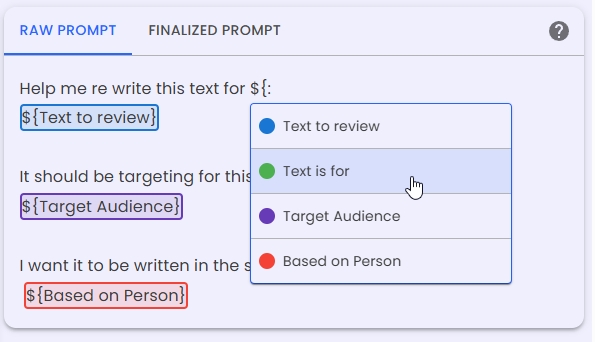
The 'RAW Prompt' tab a place for you to craft your prompt using color coded variables. This also makes it much simpler to work with complex prompts.
The Finalized Prompt
The 'FINALIZED PROMPT' you will hardly look at besides making sure your final prompt is replacing all the values with what you were wanting.
Leveraging Variables for Dynamic Prompts
Variables are key to creating adaptable and reusable prompts. They act as dynamic placeholders that can be populated with different values, allowing a single prompt template to serve multiple purposes.

Defining Variables:
Variables are defined using the syntax: ${variableName}. For example, ${userGoal} or ${outputFormat}. This allows you to abstract parts of your prompt that are likely to change.
Utilizing Defined Variables:
When typing $ followed by { within the 'RAW Prompt' editor, an auto-suggestion list of your currently defined variables will appear, streamlining their insertion into your prompt.
Showcasing Prompt Efficacy with Examples
The 'Examples' section allows you to link or demonstrate outputs generated by your prompt. This is invaluable for:
- Verifying the prompt's effectiveness for specific use cases.
- Building a library of successful prompt templates and their results.
- Sharing best practices and proven prompt structures with others.
- Link to previous or future versions of the prompt


Streamlining with the AI Prompt Converter (Pro Feature)
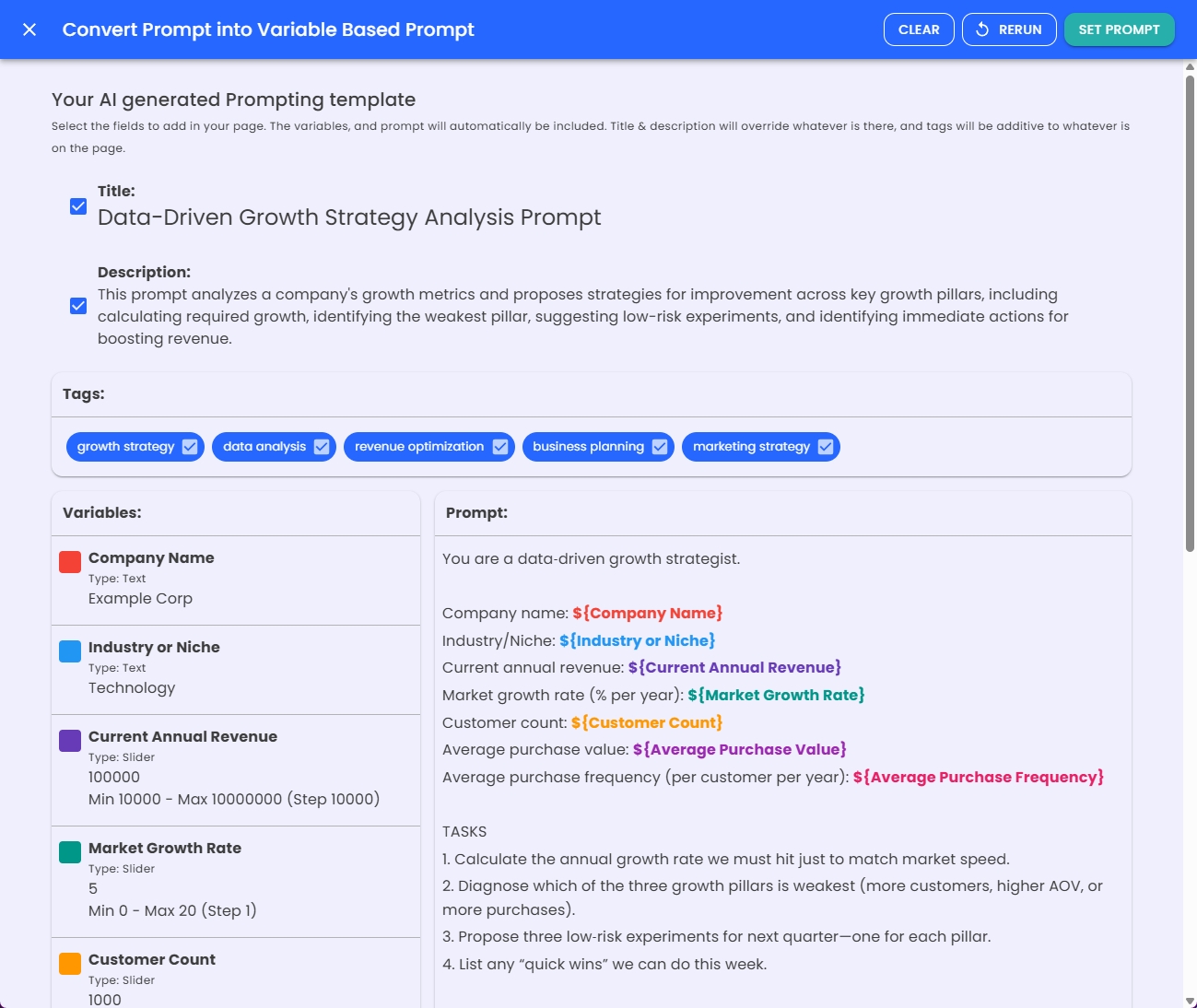
For Pro users, the AI Prompt Converter is a powerful utility designed to accelerate the process of templatizing existing prompts. It analyzes a given prompt and attempts to identify and convert static elements into variables. While the automated conversion provides a strong foundation, you can then refine the suggested variables and prompt structure to perfectly match your requirements for a robust, variable-driven template. It also provides you with a suggested title, description, and tags for your AI Prompt.
This editor empowers you to move beyond static prompts, fostering a more systematic and efficient approach to AI interaction.
Create an account to create public content for free!
With an account you can:
Organize your work by saving anything to your private dashboard
Copy any page you can see
Subscribe to get in app notifications changes of pages
Create your own curated searches for content you care about
Follow others
View history of what you have created, updated, or viewed
Upgrade to Pro!
Limited time offer
When signing up for a year, I will work with you for an hour to create prompts specific for your needs!Add specific people to edit or view your content
Use much higher AI limits plus advanced tools for prompts, pages, and apps.
Connect compatible external AI tools to the context you save in MyiWorlds.